WH-347 generator › How to fill out the WH-347
How to fill out the 2025 WH-347, field by field
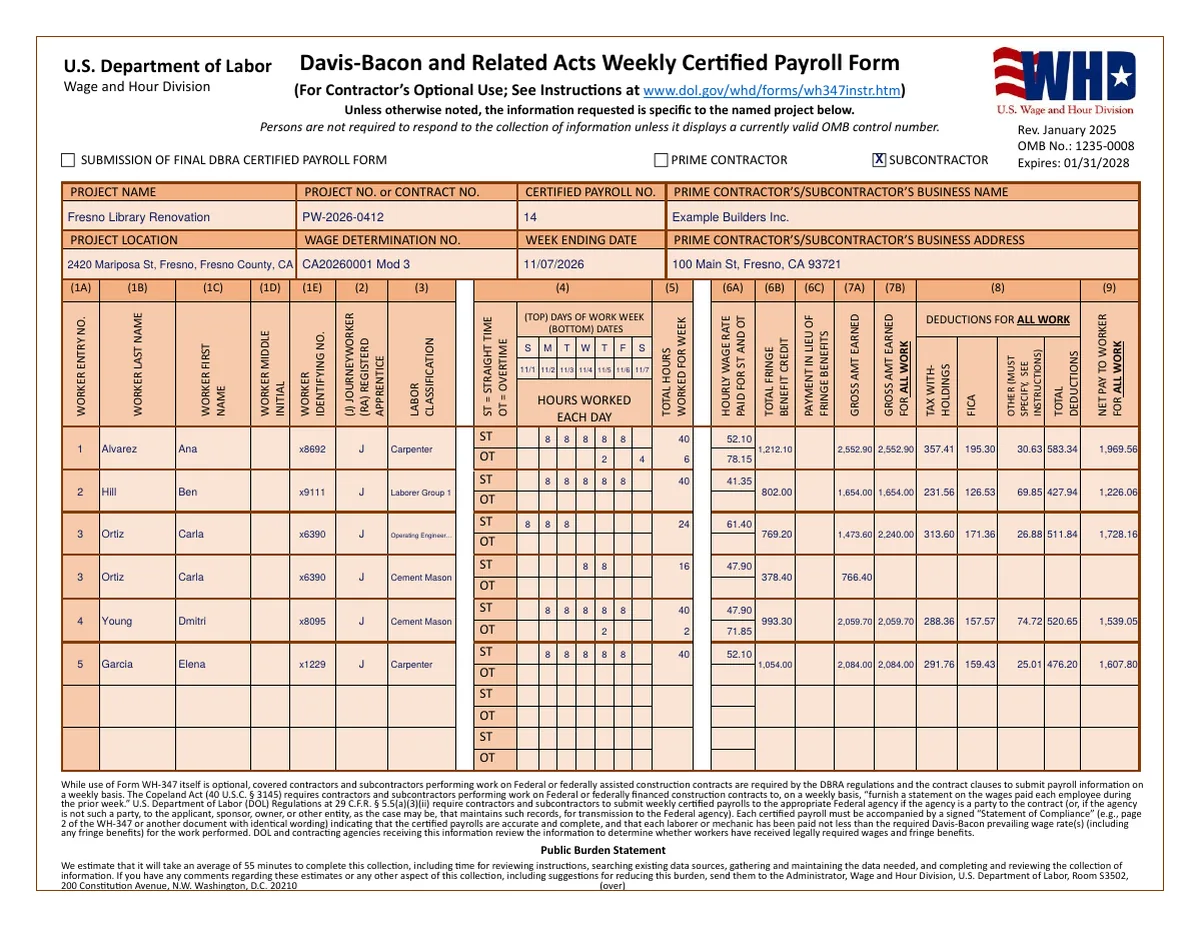
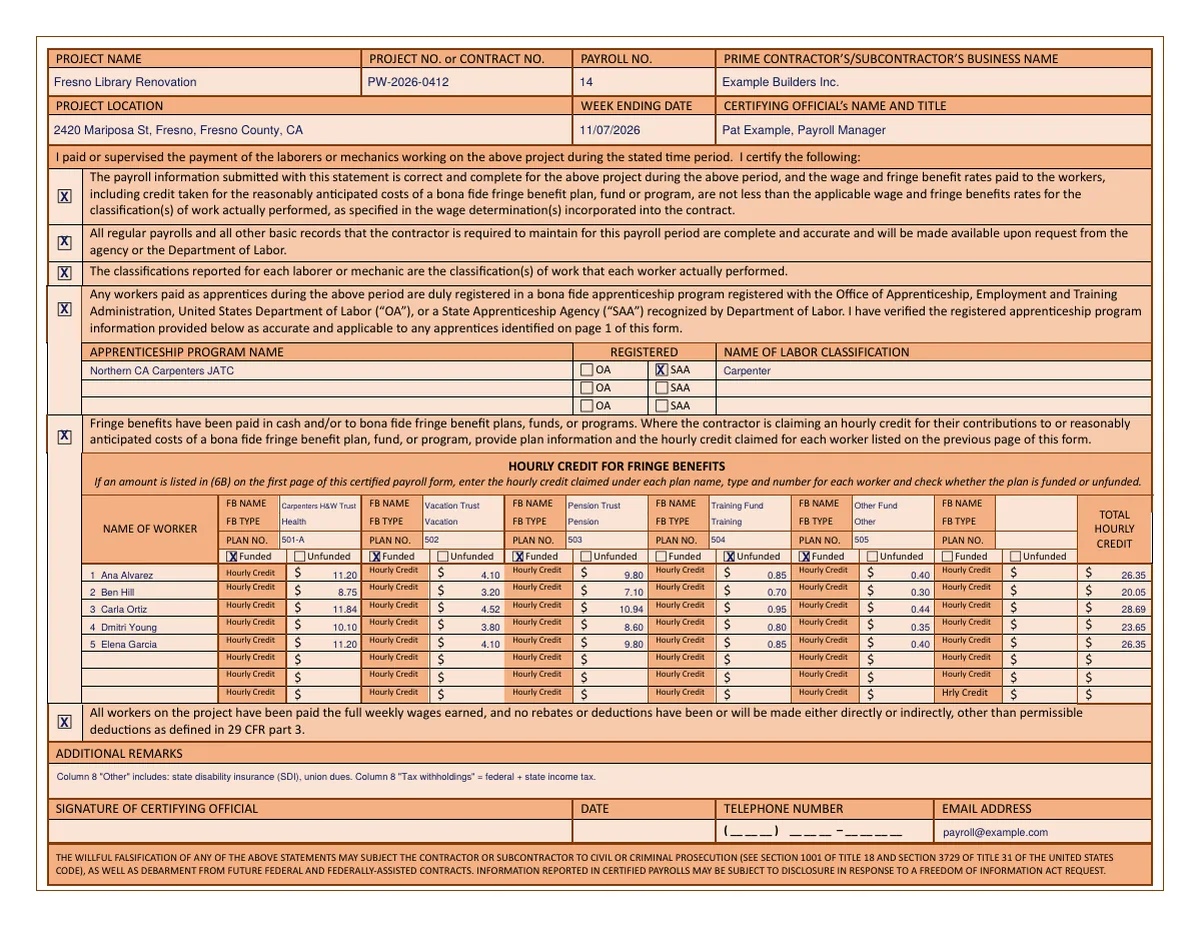
The WH-347 is the Department of Labor's optional form for the weekly certified payroll required on Davis-Bacon construction contracts. The current version is dated January 2025 (OMB 1235-0008, expires 01/31/2028). It has two pages: page 1 lists every worker's hours and pay, page 2 is the signed Statement of Compliance with apprentice and fringe benefit details. Below is every box, in order, with the rule from DOL's instructions and the mistakes we see most.
Who files it, how often, and where
Contractors and subcontractors on federal or federally assisted construction contracts covered by the Davis-Bacon and Related Acts must submit payroll information every week they work on the contract. The WH-347 itself is optional: any format with the same information and a signed Statement of Compliance worded like page 2 is acceptable. Payrolls go to the contracting agency, or, when the federal agency isn't a party to the contract, to the applicant, sponsor or owner who passes them on. Subcontractors usually send theirs to the prime contractor.
Number payrolls from 1 for each project, one per week worked, and keep the number sequence going even for weeks with no work.
Page 1 header
- Submission of final DBRA certified payroll form
- Check it on the payroll for your last week of work on the contract.
- Prime contractor / Subcontractor
- Check one.
- Project name
- The name of the project you're reporting on.
- Project no. or contract no.
- The project number or the prime contract number tied to your contract, if available.
- Certified payroll no.
- Start with 1 and number each weekly payroll in sequence, based on the weeks worked under the contract.
- Business name
- Your company's legal name.
- Project location
- The full address of the project. If there is none, describe the location, including at least the county or counties and the state.
- Wage determination no.
- Every wage determination number and revision (modification) number in the contract that applies to workers on this payroll. More than one may be needed, for example a building and a heavy determination on the same job.
- Week ending date
- The last day of the workweek covered.
- Business address
- Your company's full address.
Columns 1A–3: the worker
- 1A Worker entry no.
- Number workers starting at 1. Continue the numbering on additional sheets (the second sheet starts at 9). A worker who appears on several lines because they worked in several classifications keeps the same entry number on each line.
- 1B–1D Last name, first name, middle initial
- Self-explanatory.
- 1E Worker identifying no.
- The last four digits of the worker's Social Security number, or another number unique to that worker such as an employee ID. Full Social Security numbers must not be included.
- 2 Journeyworker or registered apprentice
- "J" for journeyworker or "RA" for registered apprentice. For apprentices, also show their progression level in the approved program, for example "RA 3".
- 3 Labor classification
- The classification of the work actually performed, as listed in the wage determination. If no classification fits, contact the contracting officer or agency representative straight away. A worker who did work in more than one classification gets a separate line for each, with the hours worked in each. If those hours weren't accurately recorded, DOL requires paying the highest applicable rate for all hours.
Columns 4–5: hours
- 4 Days and dates; hours worked each day
- In the top row of the column header write the first letter of each day of the workweek (S M T W T F S) and below it the date. On each worker line, enter straight-time hours in the ST row and overtime hours in the OT row. Under the Contract Work Hours and Safety Standards Act, hours over 40 in the workweek are overtime, counting hours on and off the covered job.
- 5 Total hours worked for the week
- The sum of column 4 for that line: straight time on the ST row, overtime on the OT row.
The form has no double-time row. If you pay double time, the common practice is to include those hours in the OT row and explain them, with the rate, in Additional Remarks on page 2. Check with your contracting agency if they prefer another method.
Columns 6A–9: rates, fringes, pay and deductions
- 6A Hourly wage rate paid for ST and OT
- The actual straight-time rate on the top row and the overtime rate on the bottom row for the classification in column 3. Don't include cash paid in lieu of fringe benefits here.
- 6B Total fringe benefit credit
- Total hours on the line × the hourly fringe credit you claim for that worker on page 2. This is the credit for contributions to bona fide plans, funds or programs.
- 6C Payment in lieu of fringe benefits
- The total cash paid to the worker instead of fringe benefits for the week: total hours × the cash hourly amount.
- 7A Gross amount earned
- Gross pay for the hours worked on this federal or federally assisted project.
- 7B Gross amount earned for all work
- Gross pay for all work during the week, including other projects and non-Davis-Bacon work.
- 8 Deductions for all work
- Tax withholdings, FICA, other deductions and the total. Use the deductions for all work and don't prorate them to the project. If there is one "other" deduction, describe it in Additional Remarks; if there are several, itemize them in an addendum. Apart from the deductions allowed by 29 CFR 3.5, deductions need prior DOL approval.
- 9 Net pay to worker for all work
- The actual dollar amount paid to the worker for all hours on all projects that week.
Page 2: Statement of Compliance
Repeat the project name, project or contract number, payroll number, business name, project location and week ending date at the top, and add the certifying official's name and title: the person who paid or supervised the payment of the workers. Then the statements:
- Payroll is correct and complete, and wage and fringe rates paid are not less than the wage determination. Always check.
- Records are complete and available to the agency or DOL on request. Always check.
- Classifications are those of the work each worker actually performed. Always check.
- Apprentices are registered in a program registered with the Office of Apprenticeship (OA) or a recognized State Apprenticeship Agency (SAA). Check only if anyone was paid as an apprentice.
- Fringe benefits have been paid in cash and/or to bona fide plans. Check if you pay fringe benefits.
- Full weekly wages have been paid with no rebates or deductions other than those permitted by 29 CFR part 3. Always check.
Notarization isn't required, but the statement is made under penalty of law: willful falsification can lead to prosecution under 18 U.S.C. § 1001 and 31 U.S.C. § 3729 and to debarment.
Apprenticeship programs
If box 4 is checked, list each apprenticeship program name, whether it is registered with OA or an SAA, and the labor classification. The form has room for three; use an addendum for more. If no apprentices worked, leave box 4 unchecked and write "N/A" under Apprenticeship Program Name.
Hourly credit for fringe benefits
If you claim a credit for contributions to fringe benefit plans (column 6B has amounts), fill in the table:
- For each plan: FB name, FB type (health, pension, vacation, training…), plan number, and whether it is funded or unfunded. Credits for unfunded plans need prior DOL approval under 29 CFR 5.28.
- For each worker from page 1: the entry number and name, the hourly credit for each plan, and the total hourly credit in the last column.
- Six plans fit. For more, attach an addendum with the same information for each additional set of six.
- If you pay part in plans and part in cash, fill in the table and column 6C. If you pay fringes entirely in cash, check box 5 and leave the table blank.
Remarks, signature and submission
Additional remarks is optional space for explanations: the "other" deduction, double-time hours, hourly cost of fringes. If you continue on another page, repeat the contractor and project information on it. The certifying official signs and dates page 2 and adds a phone number and email. DOL accepts legally valid electronic signatures if the method verifies the signer's identity; photocopied or scanned signatures don't meet the requirement.
Filled example
These pages were made with our generator from the QuickBooks sample file (made-up workers). Worker 3 worked in two classifications that week, so she has two lines with entry number 3.
What changed from the old form
- Page 2 grew. The Statement of Compliance is now a set of checkboxes, with tables for apprenticeship programs (OA or SAA) and for fringe benefit plans with the hourly credit per worker.
- Funded vs unfunded plans are identified for each plan.
- Gross pay is split into this project (7A) and all work (7B), and deductions are for all work.
- Apprentice level goes with "RA" in column 2.
- The old form expired on September 30, 2026, so use the January 2025 version for all new payrolls.
Questions
Is the WH-347 mandatory?
No, the form is optional. Weekly certified payroll is mandatory on covered contracts; the WH-347 is DOL's format for it. Another format with the same information and the signed statement works too.
Can I put full Social Security numbers on it?
No. Use the last four digits or another unique number such as an employee ID.
Do I file a WH-347 for a week with no work?
Agencies commonly expect a payroll marked "no work performed" for weeks between the start and end of your work, so the numbering stays continuous. Check your contract and agency's practice.
Does it need to be notarized?
No. It must be signed by the certifying official; electronic signatures that verify identity are accepted.
What if a worker did two kinds of work?
Give them a line for each classification with the hours in each, using the same entry number on both lines.
Is there a California version?
California public works payroll is reported to the Department of Industrial Relations online, either through its forms or as an XML file. See our guide to eCPR XML V2.